🏭 For Warehouses

Tools Built for Warehouses

Ship outbound freight on the bills of lading your carriers and customers hand you, print the labels your operation runs on, and keep track of every trailer in your yard. Everything runs in your browser and is completely free. What we build next comes from the warehouse teams using it. Tell us what would help.

Pick a tool

No signup required • No credit card needed • Completely free

How Outbound Dock works

This is the Outbound Dock flow — one shipment, from the bill of lading a carrier hands your shipping office to the truck pulling away from the door. (Yard Management, below, is the separate tool for trailers sitting in your yard.)
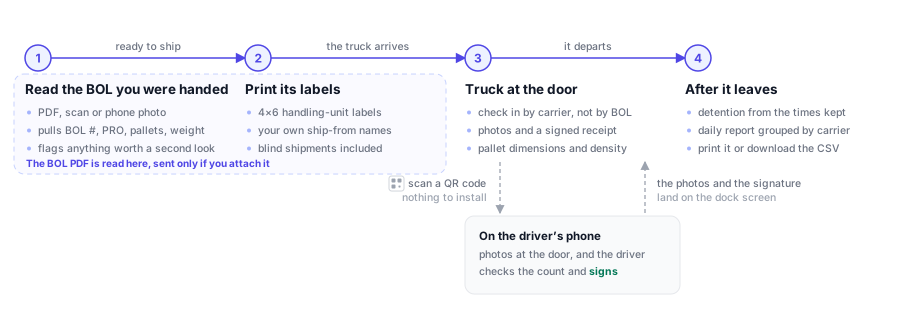
The outbound dock flow: read the carrier's BOL in your browser, print its 4x6 labels, check the truck in at the door where the driver photographs and signs for the load on their own phone, and after it leaves get the detention record and the daily report.
One bill of lading, from the PDF a carrier hands you to a signed, photographed departure — and the detention record that falls out of the times you already kept.
📦

Outbound Dock

For packaging and fulfillment sites that ship on the bill of lading the carrier or customer provides. Read the BOL instead of retyping it, then print its labels.

  • Read a BOL from a PDF, a scan, or a phone photo
  • Pulls BOL #, PRO #, carrier, PO, ship-to, pallets, pieces, and weight
  • Shows the document next to the values it read, and flags anything that needs a second look
  • Missed a value? Draw a box around it on the document
  • Print 4x6 handling-unit labels with the ship-from names you set up, blind ones included
  • Check trucks in by carrier: one check-in puts every ready BOL for that carrier on the truck
  • Daily outbound report grouped by carrier, to print or download as CSV
  • Dashboard of trucks in and out, BOLs read, and how long trucks wait for a door and spend at it, by day, hour and carrier
  • Photograph the load at the door from a phone: scan a QR code, nothing to install
  • Signed pickup receipt: the driver checks the count and signs on their phone
  • Detention record from the check-in and departure times you already keep
  • Pallet dimensions and a density check before the truck leaves
  • Record the lot codes on each shipment, then find every load a lot went out on and download it as a CSV for a food traceability request
  • Print a scan sheet with the labels: the driver signs for the load and reprints labels from their own phone, with no app to install
  • BOLs are read in your browser; the document is only uploaded if you tick the box to attach it to a scan sheet
Open Outbound Dock →

Preview: turn on sync to share shipments between your office and dock computers. We're still tuning it on real carrier documents.

🏷️

Batch Label

For sites that print the same label over and over with different values on it. Design the label once, then print one for every row of a spreadsheet.

  • Design a 4×6 label by dragging fields where you want them
  • Bind each field to a column of your file — ship-to, SKU, lot code, whatever you ship on
  • Upload a CSV and get one label per row, up to 100 at a time
  • Real CODE128 barcodes from any column
  • GS1-128 SSCC pallet labels from the codes your system already issued for the ASN; a wrong or repeated SSCC stops the run instead of going on a pallet
  • Matching column names are mapped for you; the rest you set once and it remembers
  • Keep as many templates as you need, one per customer or product line
  • The file is read in your browser and is never uploaded
Open Batch Label →

Preview: the designer and the printing work; tell us what your labels need and we'll build toward it.

🚛

Yard Management

Free yard management for sites that want to see every trailer and every move, without a WMS project.

  • Dock appointments
  • Gate check-in and check-out
  • Trailer inventory and yard map
  • Move requests for yard drivers
  • Mobile check-in and reports
Open Yard Management →
Help decide what we build next

Built with the people who use it

Outbound Dock started with one warehouse writing in about the BOLs its carriers hand it and the labels that went with them. Your dock is different, so tell us where it still runs on paper.

  1. Tell us what slows you down. A sentence or two is plenty: what you were doing, and what got in the way.
  2. We build it into the free tools. It shows up in the tool you already use, with no new account.
  3. Everyone with the same problem gets it. The next shipping desk, dispatcher or dock clerk finds it already solved.

Built because someone asked

Outbound Dock started from one warehouse's email describing its dock.
What would make your job easier?

The task that still takes too long, the step you do twice, the thing you wish one of these tools did.

Only what you type here is sent. Prefer email? Write to info@loaddesk.io.